Custom Business Software: The Complete Guide for Small & Medium Businesses [2026]

Your team is drowning in spreadsheets.
Sales data lives in one system. Customer info in another. Your unique workflow? It’s held together with duct tape, manual processes, and the prayers of your most patient employees.
Sound familiar?
You’ve looked at off-the-shelf software. Nothing quite fits.
The ones that come close cost a fortune, force you to change your proven processes, and still require workarounds for your most critical needs.
What if there was another way?
Custom business software might be the answer. Every software project is an investment. You need to know when you’ll get your money back.
But it’s a significant investment, and you need to know if it’s right for your business.
Here’s what you’ll learn:
- What custom business software actually is (and isn’t)
- When it makes financial sense
- What it costs and how long it takes
- How to choose the right developer
- Your potential ROI (free calculator below)
Let’s get into it.
Key Takeaways
- Custom vs. Off-the-Shelf: Custom adapts to you; off-the-shelf forces you to adapt.
- Cost Reality: Higher upfront ($15k-$150k+), but often cheaper over 3-5 years due to no licensing fees.
- When to Buy: Unique workflows, integration needs, or competitive advantage are key drivers.
- Ownership: You own the code and data, eliminating vendor lock-in and forced price hikes.
What Is Custom Business Software?
Custom business software is built specifically for your business. Not for thousands of companies. Just yours.
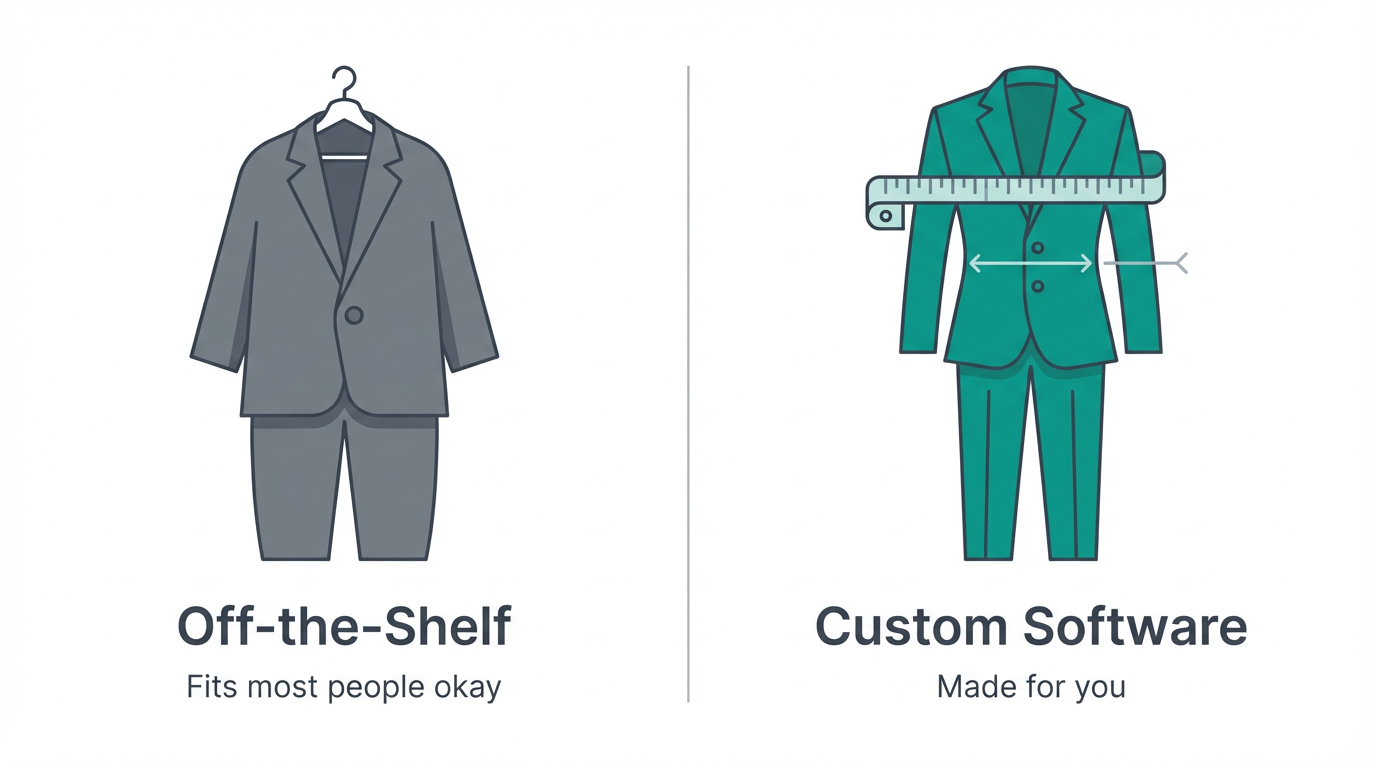
Think of it like buying a suit:
- Off-the-shelf software = Suit off the rack. Fits “most people” reasonably well. You adjust your posture to make it work.
- Custom software = Tailored suit. Measured for your body, your style. Fits perfectly because it was made for you.
Same idea with software.
It’s built to fit your business, not the other way around. It’s the difference between buying a suit off the rack (SaaS) and getting one tailored to your exact measurements (Custom).
What Makes It Different
Built for YOUR processes
Software adapts to how you work, not the other way around.
You own it
The code, the data, the platform. No vendor lock-in.
Scales on your terms
Add features when you need them, grow when you’re ready.
Integrates with everything
Connects to your existing systems exactly how you need.
Types of Custom Business Software
Custom business software can take many forms:
Custom CRM Systems
- Manage customers, leads, and relationships your way
- Track interactions across your unique sales process
- Integration with your specific tools and data sources
Business Intelligence
- Pull data from multiple sources into one view
- Custom metrics that matter to YOUR business
- Real-time insights for faster decision-making
Workflow Automation
- Automate your specific processes (not generic workflows)
- Connect systems that don’t normally talk to each other
- Eliminate manual data entry and errors
Industry-Specific Apps
- Healthcare: HIPAA-compliant patient management
- Manufacturing: Custom inventory and production tracking
- Legal: Case management and document automation
Integration Platforms
- Custom middleware connecting your tech stack
- API layers for legacy system modernization
- Data synchronization across platforms
Mobile Business Apps
- Field service management
- Sales team enablement
- Remote workforce tools
The common thread? These solutions don’t exist as off-the-shelf products.
Or if they do, you’d need so many customizations that building custom makes more sense.
Why Businesses Choose Custom Software: 7 Reasons
1. Perfect Fit for Your Workflow
You’ve spent years refining your processes. You know what works. But every software you try forces you to adapt to THEIR way of doing things.
Custom software mirrors your exact workflow. Not a compromise version.
Real example: Manufacturing company had a unique production scheduling system - their competitive edge. Off-the-shelf software required them to change it. Instead, they built custom software around their process. Kept their advantage AND automated their operations.
Here’s the truth: Your processes are more sophisticated than you think. Generic software assumes everyone works the same way. They don’t.
2. Competitive Advantage You Can't Get Elsewhere
Here’s what most business owners miss: Your competitors are using the same software you’re considering.
Think about that. Salesforce, HubSpot, QuickBooks, Shopify - everyone in your industry uses the same tools. How do you differentiate?
Custom software becomes a proprietary asset:
- Amazon’s fulfillment system
- Uber’s dispatch algorithm
- That competitor you can’t figure out how they move so fast (probably custom software)
3. True Ownership (No Vendor Lock-In)
What you own with off-the-shelf software: Nothing.
- Monthly subscriptions forever
- Subject to price increases
- Feature changes you don’t control
- Can’t modify or extend
- If they shut down, you’re stuck
What you own with custom software: Everything.
- The code (100% yours)
- The data (in your control)
- The platform (your infrastructure)
- The roadmap (you decide features)
- The timeline (you set priorities)
Financial impact: No $500/month that becomes $750/month that becomes $1,200/month. One investment, then just hosting and maintenance.
4. Scalability Without Limits
The off-the-shelf trap:
- Start on the $99/month plan
- Grow to $299/month (more users)
- Hit the $799/month tier (more features)
- Enterprise pricing: “Contact us” (Translation: $5,000+/month)
The custom approach:
- Build what you need now
- Scale infrastructure as you grow (actual costs, not artificial tiers)
- Add features based on ROI, not vendor pricing
- No penalties for success
Real example: SaaS company was spending $3,500/month on customer support software. They grew to 1,000+ customers. Price jumped to $8,000/month. They built custom for $45,000. Break-even in 6 months. Savings after year one: $51,000.
5. Integration Freedom
The current state of most businesses:
- Sales data in CRM
- Financial data in accounting software
- Customer data in support system
- Marketing data in email platform
- Custom data in… spreadsheets

The dream: One unified view. All systems talking to each other. No manual data entry.
Off-the-shelf reality:
- “Integrations available!” (for the top 10 most popular tools)
- Everything else requires Zapier, Make, or manual work
- Data syncs break, causing chaos
Custom software reality:
- Connect to ANY system with an API
- Build custom integrations for legacy systems
- Real-time data synchronization
- One source of truth
Example: Healthcare practice needed to integrate EHR, scheduling, billing, review management, and patient communication. No off-the-shelf solution did all of this. Custom integration platform connected everything. Saved 15 hours/week of manual data entry.
6. Better Security & Compliance
Industry requirements:
- Healthcare: HIPAA compliance
- Finance: SOC 2, PCI-DSS
- Legal: Attorney-client privilege
- Enterprise: Custom security protocols
Off-the-shelf approach: Hope the vendor has the certifications you need. Accept their security model. Trust they won’t have a data breach.
Custom approach:
- Design security exactly to your requirements
- Choose where data is stored
- Control access at every level
- Audit trail customized to your compliance needs
- No sharing infrastructure with thousands of other companies
For regulated industries, custom often isn’t optional - it’s required.
Off-the-shelf security is “one size fits all.” Custom security is “fits exactly you.”
You define exactly who sees what, where data is stored, and how it’s encrypted.
7. Long-Term ROI (The Math That Matters)
Here’s the calculation most businesses don’t make:
Scenario: Medium-sized business using multiple SaaS tools
Current annual costs:
- CRM: $12,000/year
- Project management: $3,600/year
- Custom reporting: $6,000/year
- Integration platform: $2,400/year
- Total: $24,000/year
What happens over 5 years?
- Year 1: $24,000
- Year 2: $26,400 (10% increase)
- Year 3: $29,040
- Year 4: $31,944
- Year 5: $35,138
- Total: $146,522
Custom alternative:
- Development: $75,000
- Annual hosting/maintenance: $3,000/year
- 5-year total: $87,000
Savings: $59,522 (and you own the software)
That’s real money that goes back into your pocket.

And that’s before we even talk about the value of your data.
[!TIP] Want a custom ROI analysis? Every business is different. Contact us for a free consultation to run the numbers for your specific situation.
5 Signs You Need Custom Software
Not every business needs custom software. Here’s how to know if you do.
Sign #1: You've Outgrown Off-the-Shelf
You know you’re here when:
- “We use this workaround because the software doesn’t do X”
- Using 5+ tools to accomplish one workflow
- Exporting from one system and importing to another manually
- “We do it the software’s way because we have to”
- Your most valuable employees spend hours on admin work
The tipping point: When workarounds cost more than solutions.
Quick test: Add up the hours your team spends on workarounds per week. Multiply by hourly cost. If that’s over $500/week, you’re spending $26,000/year on inefficiency.
Sign #2: Your Process Is Your Competitive Advantage
Indicators:
- “I can’t find software that does it our way”
- Your process is what makes you successful
- Industry-specific workflow that doesn’t exist in generic tools
- Proprietary methodology you’ve developed
Example industries:
- Medical practices with unique patient care models
- Manufacturing with custom production processes
- Professional services with specialized deliverables
- Logistics companies with unique routing algorithms
The question: If your process is what makes you successful, why force it into generic software?
Sign #3: Integration Nightmares
The symptoms:
- Data exists in silos
- Multiple versions of the same information
- “Which system has the right data?”
- Manual data entry between systems
- Reports require pulling from 3+ sources
The breaking point: When integration problems cause lost sales, angry customers, or team frustration.
Reality check: Zapier and Make are great, but they’re band-aids. If you’re paying $200+/month for integration tools AND still doing manual work, that’s a sign.
Sign #4: You're Spending $20,000+/Year on Software
Do this exercise:
- Add up all your software subscriptions
- Include per-user costs × number of users
- Add integration tools (Zapier, etc.)
- Don’t forget training, workarounds, tech support
If you’re over $20,000/year: Custom software starts making financial sense.
If you’re over $50,000/year: Custom is likely significantly cheaper.Break-even math:
- $50,000 investment in custom software
- $20,000/year savings on subscriptions
- Break-even in 2.5 years
- Everything after is pure savings
Sign #5: You're Planning to Scale
Growth scenarios:
- Doubling your team
- Expanding to new locations
- Adding new product lines
- Entering new markets
The off-the-shelf problem:
- Pricing explodes with growth
- “We need the enterprise plan now” ($$$)
- Features you don’t need, but must buy
- Platform limits (users, records, API calls)
The custom advantage:
- Infrastructure scales at actual cost
- No artificial limits
- Add features that support YOUR growth
- Platform grows with you, not against you
Future-proofing: Will your current software support you at 2x your size? 5x? 10x?
What Custom Software Actually Costs
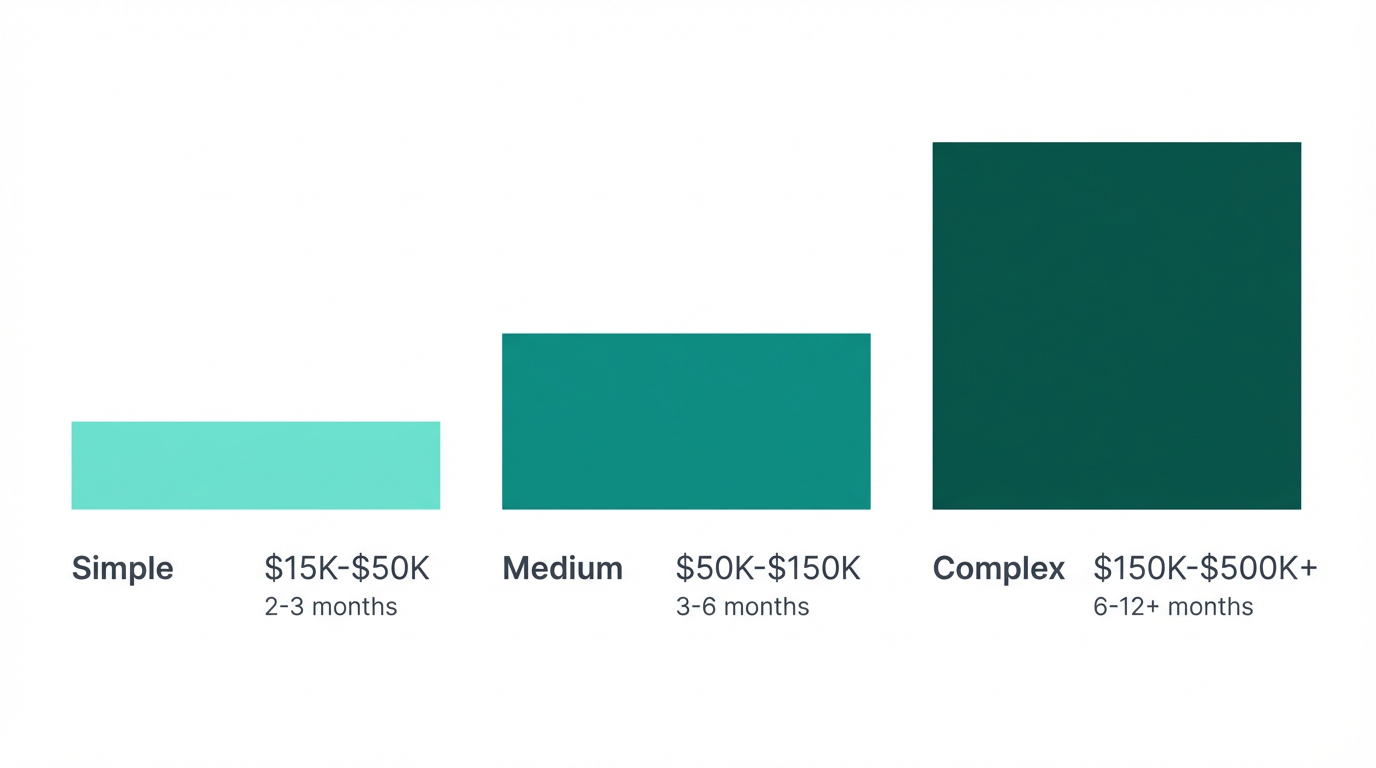
Let’s talk about what everyone wants to know: What does this actually cost?
Pricing Ranges (2026 Market Rates)
Simple Applications
What you get:
- Basic CRUD functionality (Create, Read, Update, Delete)
- 3-5 core features
- Simple user interface
- Basic reporting
- Mobile-responsive web app
Best for: Small businesses with straightforward needs, clear requirements
Medium Complexity
What you get:
- 10-20 features
- Multiple user roles and permissions
- Integration with critical legacy systems
- Custom reporting and dashboards
- API for future extensions
Best for: Growing businesses with specific requirements, need for integration
Complex Systems
What you get:
- Comprehensive feature set
- Complex business logic
- Multiple integrations (5+ systems)
- Advanced analytics and AI/ML
- Native mobile apps (iOS + Android)
- High-scale infrastructure
- Compliance requirements (HIPAA, SOC2)
Best for: Established businesses with complex operations, regulatory requirements
What Affects the Cost?
1. Feature Complexity
- Simple: Basic forms, lists, searches → Lower cost
- Medium: Workflows, approvals, calculations → Medium cost
- Complex: AI, machine learning, real-time processing → Higher cost
Rule of thumb: Each major feature = $2,000-$10,000 depending on complexity
2. Number of Integrations
- No integrations: Just standalone software
- 1-3 integrations: Common tools with good APIs → +$5,000-$15,000
- 5+ integrations: Multiple systems, some with legacy APIs → +$20,000-$50,000
- Legacy systems: Reverse engineering, custom connectors → +$30,000+
Real talk: Integration is often 30-40% of project cost. But it’s also the highest ROI feature.
3. Design Requirements
- Basic/Functional: Clean but simple → Included
- Custom UI/UX: Professional design, user testing → +$10,000-$25,000
- Advanced: Animations, complex interactions, branded experience → +$25,000-$75,000
Worth noting: Good UX = better adoption = better ROI. Don’t skip this.
4. Mobile Requirements
- Web-responsive: Works on mobile browsers → Included
- Progressive Web App (PWA): App-like on mobile → +$5,000-$15,000
- Native iOS or Android: One platform → +$20,000-$50,000
- Native iOS + Android: Both platforms → +$40,000-$100,000
Decision factor: Do your users NEED native apps, or is responsive web enough?
5. Timeline
- Standard pace: Estimate above
- Rush (30% faster): +25-40% cost
- Extended (slower, part-time): -15-25% cost
Truth: Fast, good, cheap - pick two. Rushing almost always costs more and often reduces quality.
Hidden Costs Most People Forget
- Ongoing hosting: $50-$500/month depending on scale
- Maintenance: $200-$2,000/month for updates, bug fixes, support
- SSL certificates, domains, etc.: $100-$500/year
- Third-party services: Email, SMS, payment processing fees
- Training: Time investment for your team to learn the system
Budget rule: Plan for 15-20% of development cost annually for maintenance and hosting.
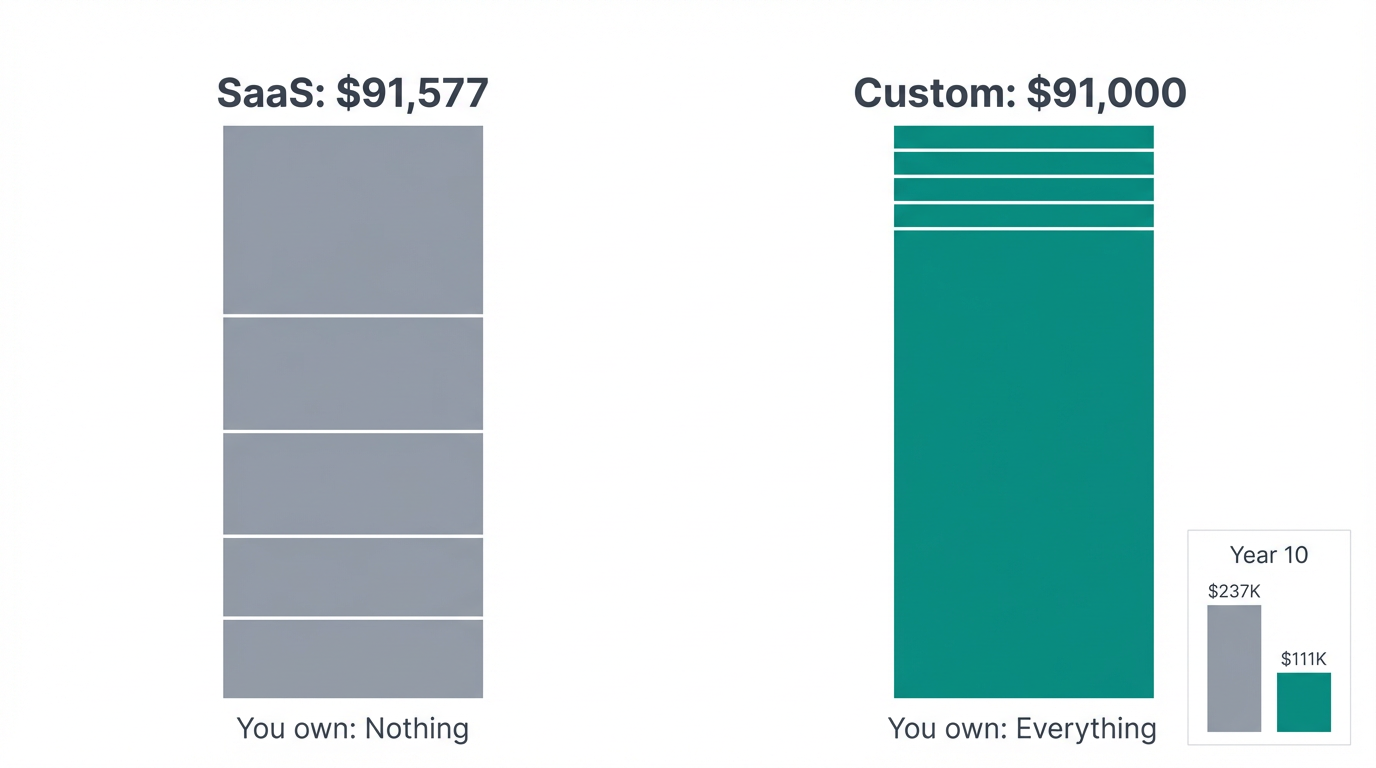
Cost Comparison: Custom vs. Off-the-Shelf (5-Year Total)
| Factor | Off-the-Shelf SaaS | Custom Software |
|---|---|---|
| Year 1 | $15,000 (subscriptions) | $75,000 (development) |
| Year 2 | $16,500 (10% increase) | $4,000 (hosting + maintenance) |
| Year 3 | $18,150 (10% increase) | $4,000 |
| Year 4 | $19,965 (10% increase) | $4,000 |
| Year 5 | $21,962 (10% increase) | $4,000 |
| 5-Year Total | $91,577 | $91,000 |
| Ownership | ❌ Zero (you own nothing) | ✅ Complete (you own everything) |
| Customization | ⚠️ Limited (what vendor allows) | ✅ Unlimited (it’s yours) |
| Scalability | ⚠️ Tier-based pricing | ✅ Pay for actual usage |
| Year 10 Total | $237,468 | $111,000 |
This scaling efficiency is why enterprise starts here. Plus you own an asset.
How Custom Software Is Built: The 5-Phase Process
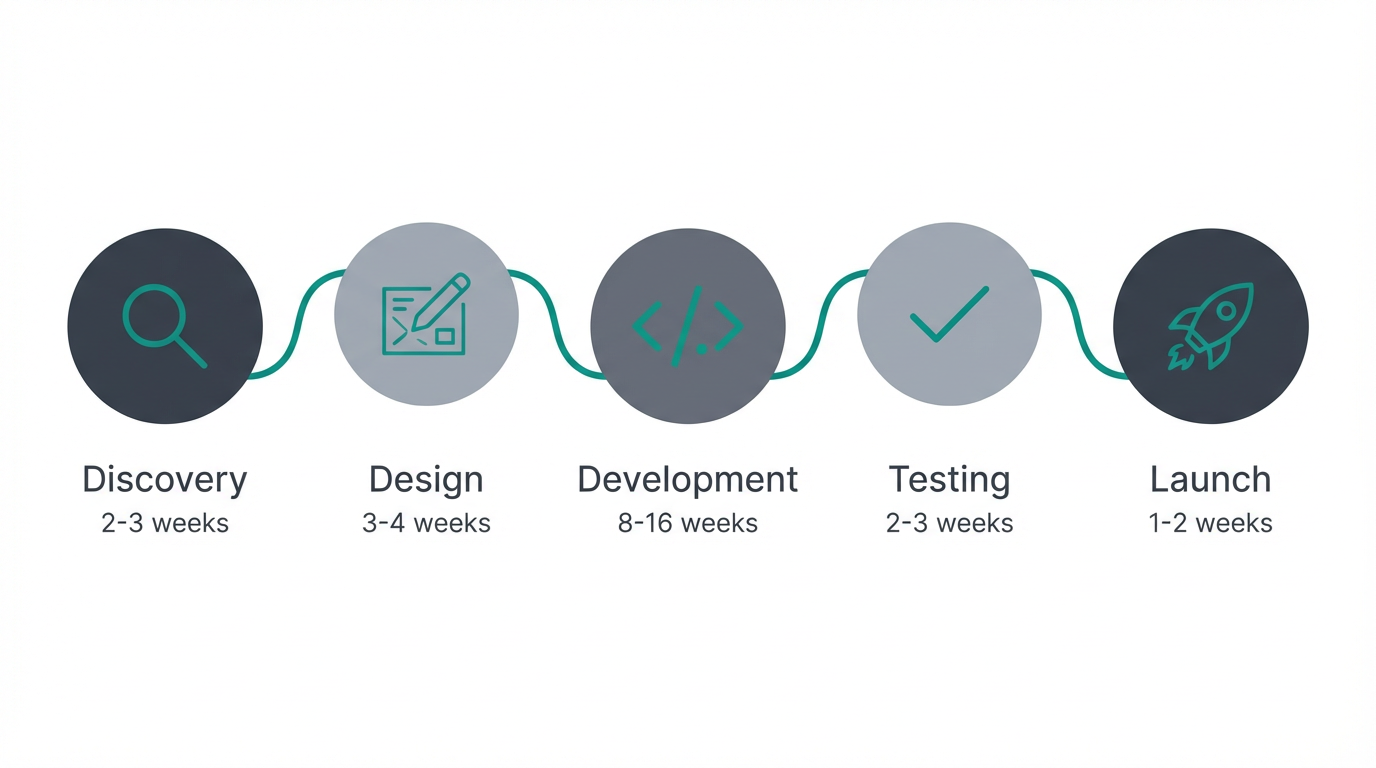
Worried about the development process? Here’s exactly how it works when you partner with the right developer.
Discovery & Requirements
2-3 weeksWhat happens:
- Deep dive into your business and current workflows
- Document pain points and opportunities
- Define exact requirements and success metrics
- Create project scope and timeline
- Identify technical constraints and dependencies
Your involvement: High (5-10 hours/week)
Deliverables:
- Requirements document (what we’re building)
- Project timeline and milestones
- Budget breakdown
- Technical architecture plan
Why this matters: Getting requirements right saves 10x the cost of fixing things later. Better to spend extra time here than rebuild later.
Design & Prototyping
3-4 weeksWhat happens:
- Create wireframes (blueprints of each screen)
- Design user interface and user experience
- Build clickable prototype
- Get your feedback and refine
- Plan database structure and technical architecture
- Define API specifications
Your involvement: Medium (3-5 hours/week for feedback)
Deliverables:
- Clickable prototype (you can test before we code anything)
- Visual designs for all screens
- Technical specifications
- Database schema
Why this matters: Seeing a working prototype helps you confirm this is what you want. Changes are cheap now, expensive later.
Development
8-16 weeksWhat happens:
- Build in 2-week sprints
- Demo working features every 2 weeks
- Incorporate your feedback iteratively
- Write automated tests to ensure quality
- Set up staging environment for testing
Your involvement: Low-medium (1-2 hours every 2 weeks for demos)
Deliverables:
- Working software in your users’ hands
- Documentation and training guides
- Sprint demos and updates
- Access to staging environment
Why this matters: Regular demos mean you’re never surprised. You see progress, provide feedback, and we adjust.
How we avoid scope creep:
- Clear requirements from Phase 1
- Changes tracked and discussed
- Impact on timeline/budget communicated before proceeding
Testing & Refinement
2-3 weeksWhat happens:
- User acceptance testing (your team tests everything)
- Load and performance testing
- Security testing and penetration testing
- Bug fixes and polish
- Documentation creation
Your involvement: High (10-15 hours total for testing)
Deliverables:
- Production-ready software
- Test results and quality assurance reports
- User documentation
- Admin documentation
Why this matters: Finding bugs now vs. after launch saves time, money, and reputation.
Testing checklist:
- Does it do everything we said it would?
- Can non-technical users figure it out?
- Does it handle errors gracefully?
- Is it fast enough?
- Is it secure?
Launch & Training
1-2 weeksWhat happens:
- Deploy to production environment
- Training for your team
- Migrate data (if applicable)
- Monitor closely for issues
- Provide go-live support
Your involvement: High (training sessions, ~5-10 hours)
Deliverables:
- Fully deployed system (live and operational)
- Trained team members
- Operation manuals
- Support documentation
- Success metrics dashboard
Post-launch:
- 30-day intensive support period
- Monthly check-ins
- Ongoing maintenance available
- Feature enhancement discussions
Reality check: Expect a 2-4 week adjustment period where your team gets comfortable with the new system.
Should You Build or Buy? The Decision Framework
Still not sure if custom is right for you? Use this framework.
Decision Matrix
If you have unique problems, you need unique solutions.
Choose Off-the-Shelf When:
✅ Your needs are common and standard
- “I just need basic CRM functionality”
- “We do things pretty much like everyone else”
- “We can adapt our process to match the software”
✅ Your budget is limited (under $50K total)
- Can’t afford upfront custom development cost
- Need to spread cost over monthly subscriptions
- Want to test with lower commitment
✅ You need something immediately
- Can’t wait 3-6 months for custom development
- Need solution deployed this month
- Speed is more important than perfect fit
✅ SaaS solution covers 80%+ of your needs
- Minor workarounds are acceptable
- Missing features aren’t deal-breakers
- “Good enough” is actually good enough
✅ You’re still figuring out your processes
- Business model is evolving
- Not sure what you really need yet
- Want to test different approaches
Bottom line: Off-the-shelf makes sense when you fit the mold.
Choose Custom Software When:
✅ Your workflow is unique or proprietary
- “We do things differently than competitors”
- “Our process is our competitive advantage”
- “No software does what we need”
✅ You’re spending $20K+/year on software
- Multiple subscriptions adding up
- Integration costs are high
- Custom ROI timeline makes sense
✅ Integration is critical
- Need to connect 5+ systems
- Have legacy systems that must integrate
- Real-time data sync is required
- One source of truth is essential
✅ You need a competitive advantage
- Want proprietary technology
- Software as a business differentiator
- Can’t use same tools as competitors
✅ Long-term ownership matters
- Want to own your platform
- Avoiding vendor lock-in is important
- Building company asset value
✅ Compliance requires custom solution
- HIPAA, SOC2, industry-specific requirements
- Can’t trust third-party with your data
- Custom security protocols needed
✅ You’re planning significant growth
- Will outgrow tier-based pricing
- Need platform that scales without penalties
- Current solutions won’t support 2x-5x growth
Bottom line: Custom makes sense when you need something truly yours.
The Hybrid Approach (Often the Best Answer)
The smart strategy: Use both.
Off-the-shelf for:
- Email (Google Workspace, Microsoft 365)
- Accounting (QuickBooks, Xero)
- Communication (Slack, Teams)
- Document storage (Dropbox, Google Drive)
Custom for:
- Core business processes
- Proprietary workflows
- Integration layer
- Customer-facing applications
- Competitive advantage features
Example:
- Use QuickBooks for accounting (standard)
- Build custom order management system (unique to your business)
- Create integration that syncs order data to QuickBooks
- Best of both worlds
Real Success Stories: Custom Software ROI
Let’s look at real examples of businesses that chose custom software and the results they got.
Case Study #1: Regional Real Estate Brokerage
Company: 45-agent real estate brokerage
The Problem: Using Salesforce - $18,000/year and growing. Needed MLS integration that didn’t exist. Agents frustrated with complexity. Missing key features for real estate workflow.
The Solution:
- Property management integrated with MLS data feed
- Client relationship tracking specific to real estate
- Transaction pipeline visualization
- Automated follow-up sequences
- Mobile app for agents in the field
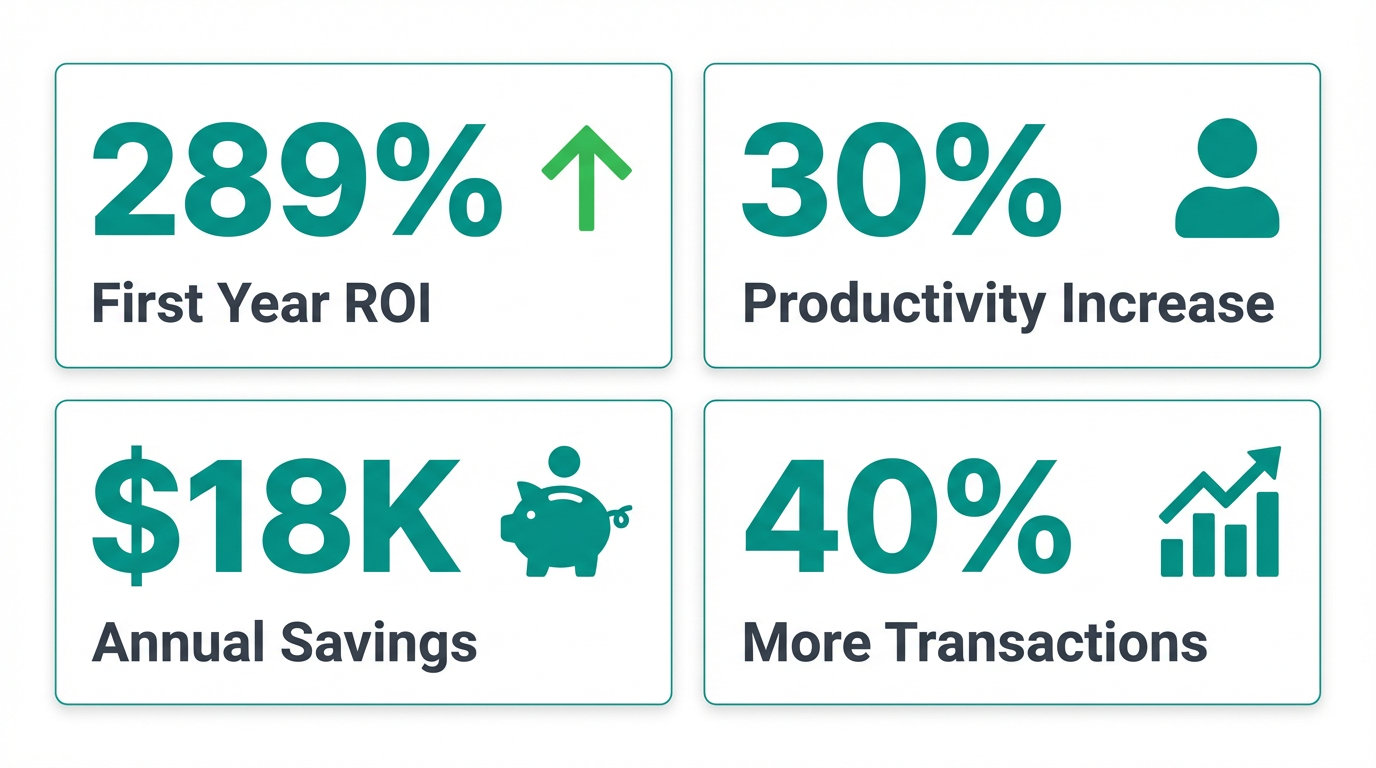
Results (Year One):
- Saved $18,000 (no more Salesforce)
- Agent productivity up 30% (less admin time)
- 40% increase in closed transactions (better follow-up)
“The custom CRM does exactly what we need, nothing more, nothing less. Our agents actually USE it because it makes their job easier, not harder.”
Case Study #2: Medical Practice
Company: 3-location family medicine practice
The Problem: Patient reviews scattered across multiple platforms. No system for requesting reviews. Negative reviews not being addressed. Reputation management manual and inconsistent.
The Solution:
- Automated review request system (email + SMS)
- Centralized dashboard for all review platforms
- Alert system for negative reviews
- Integration with practice management software
- Patient satisfaction tracking
Results (6 Months):
- Generated 500+ new reviews
- Average rating increased from 3.9 to 4.8 stars
- New patient inquiries up 45%
- Staff time on reputation management reduced from 10 hours/week to 1 hour/week
The Numbers:
- 45% increase in new patients = ~30 additional patients/month
- Average patient lifetime value = $2,400
- Monthly revenue increase = $72,000
“We tried Birdeye and Podium - spent $8,000 and got mediocre results. Our custom system cost less and works infinitely better because it fits our exact workflow.”
Case Study #3: Manufacturing Company
Company: Mid-size custom parts manufacturer
The Problem: Order processing took 3-5 days. High error rate (15% of orders had issues). Manual handoffs between sales, production, shipping. No real-time visibility into order status. Lost orders, missed deadlines, frustrated customers.
The Solution:
- Automated order workflow from quote to shipment
- Real-time production scheduling
- Inventory tracking integrated with ordering
- Customer portal for order status
- Automated notifications at each stage
Results (First Year):
- Order processing time: 3-5 days → 4 hours
- Error rate: 15% → 0.8%
- Customer satisfaction score: +34%
- On-time delivery: 67% → 94%
The Numbers:
- 25 hours/week staff time saved ($58,500/year)
- Error reduction saved ~$35,000/year
- Increased capacity allowed 20% more orders
“We were skeptical about the investment, but within 3 months we couldn’t imagine running the business without it. It’s transformed how we operate.”
Case Study #4: Marketing Agency
Company: 25 employees, 60 clients
The Problem: Client reporting extremely manual (8-10 hours per client/month). Data in multiple tools (Google Analytics, social media, ads platforms). No client self-service. Constant “where are we?” questions.
The Solution:
- Automated data aggregation from 8+ platforms
- Real-time client dashboards
- Automated monthly report generation
- Client portal for self-service access
Results (First Year):
- Reporting time: 10 hours/client → 30 minutes/client
- Time saved: 570 hours/month
- Reinvested time into new client acquisition
- New clients added: 15 (25% growth)
- Client retention: 89% → 96%
“This was the best business decision we’ve made. The time saved went directly into growing the business. Plus, clients LOVE the real-time dashboards.”
How to Choose the Right Developer
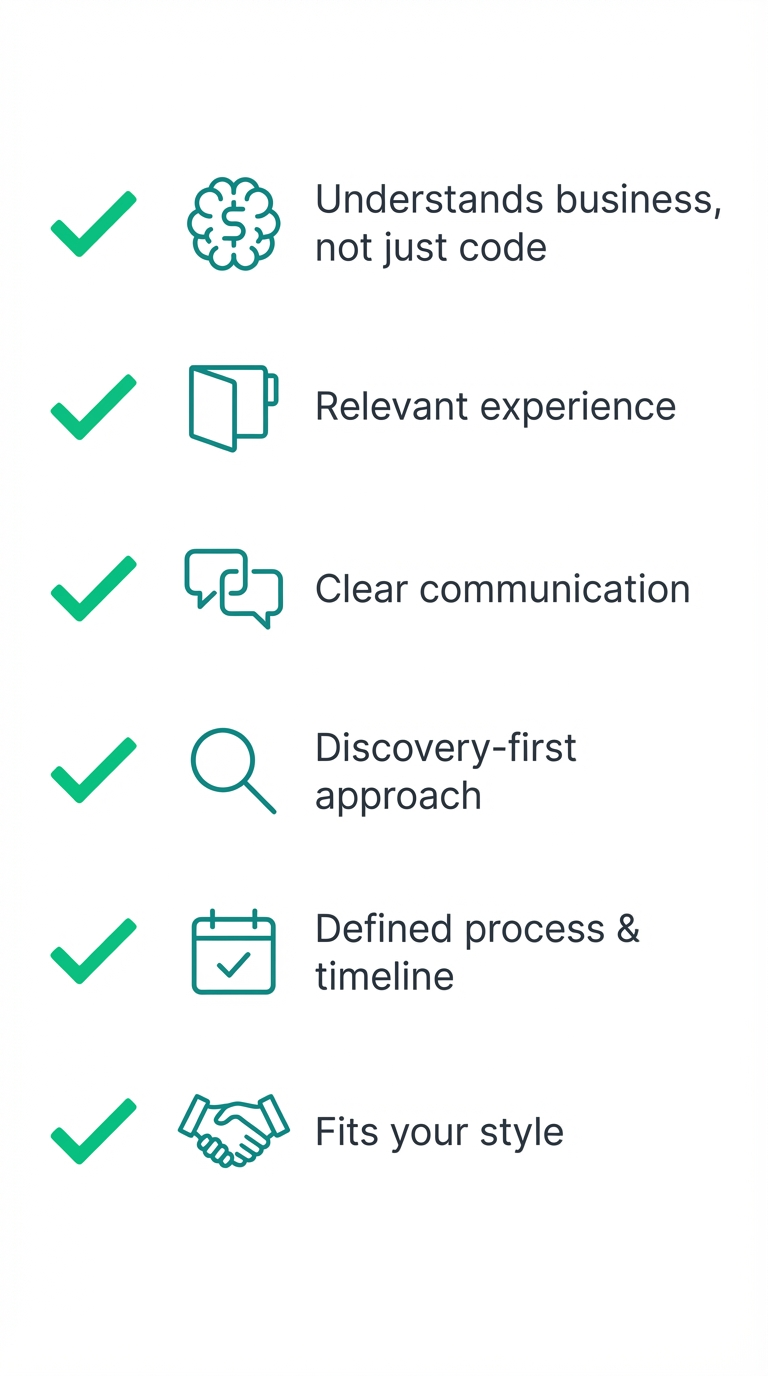
The success of your project depends heavily on choosing the right developer. Here’s how to evaluate and select.
Key Questions to Ask
- Do they understand ROI, not just code?
- Do they challenge your assumptions (in a helpful way)?
Look for developers who speak business, not just tech.
The success of your project depends heavily on choosing the right developer. Here’s how to evaluate and select.
What to Look For
Business Understanding (Not Just Technical Skills)
Ask yourself:
-
Do they ask about your business goals, or just technical specs?
-
Can they explain technical decisions in business terms?
-
Do they understand ROI, not just code?
-
Do they challenge your assumptions (in a helpful way)?
-
Red Flag: “We don’t do testing, we just fix bugs as they appear.” (Run away)

Red flag: Developer who just says “sure, we can build that” to everything without asking WHY.
Green flag: Developer who asks “What business problem are we solving?” and “How will we measure success?”

My perspective: I’m a developer who understands marketing and business metrics. I care about whether your software makes you money, not just whether the code is elegant.
Relevant Experience
Questions to ask:
- “Have you built something similar?”
- “Do you understand my industry?”
- “Can you show me working examples?”
- “Can I talk to past clients in similar situations?”
Portfolio check:
- Look for variety (shows adaptability)
- Look for completion (not just prototypes)
- Look for longevity (are clients still using it years later?)
Don’t expect perfect match: They don’t need to have built your EXACT software before, but they should have relevant domain experience.
Process & Communication
Evaluate their process:
- Do they have a clear methodology?
- How do they handle requirements gathering?
- What does their timeline look like?
- How often will you see progress?
- How do they handle changes?
Communication red flags:
- Slow to respond
- Unclear explanations
- Dismissive of questions
- “Trust me, I’m the expert”
Communication green flags:
- Proactive updates
- Clear, jargon-free explanations
- Welcomes questions
- Sets expectations clearly
Post-Launch Support
Critical questions:
- “What happens after launch?”
- “How do you handle bugs found after deployment?”
- “What are maintenance options?”
- “How do you handle feature requests later?”
- “What if I need training for new team members?”
Options to look for:
- Warranty period (30-90 days of bug fixes)
- Maintenance agreements (ongoing support)
- Training documentation
- Code handoff (if you want to maintain in-house later)
Cultural Fit & Trust
Subjective but crucial:
- Do you trust this person/team?
- Are they genuinely interested in your success?
- Do your communication styles match?
- Can you see working with them for 3-6 months?
Your gut matters: You’ll be in regular contact during development. If something feels off, it probably is.
Red Flags to Avoid
Watch out for these warning signs:
❌ Guaranteed fixed prices without understanding requirements
If you’re asking “How much?”, you’re asking the wrong question. “We can build your CRM for $30K” before asking any questions = disaster waiting to happen.
❌ “Yes” to everything without questions
Real developers know trade-offs exist. If they agree to everything, they don’t understand the complexity.
❌ No working examples or case studies
”Trust us” isn’t enough. See actual work they’ve completed.
❌ Vague about timeline or process
”It’ll take however long it takes” is not a plan.
❌ Offshore-only with significant communication barriers
Nothing wrong with offshore developers, but if communication is painful, the project will be too.
❌ Unwilling to start small or do phased approach
Good developers are confident in incremental value. All-or-nothing is risky.
❌ No discussion of maintenance or support
Software isn’t “done” after launch. If they don’t mention ongoing support, they don’t understand software lifecycle.
Questions to Ask Potential Developers
About Their Work
- “Can you show me 3 similar projects you’ve completed?”
- “Can I see the actual working software, not just screenshots?”
- “Can I speak with 2-3 past clients?”
About Process
- “Walk me through your development process from start to finish.”
- “How do you gather and document requirements?”
- “How often will I see progress and provide feedback?”
- “What happens if my requirements change mid-project?”
About Quality
- “How do you ensure the software is secure?”
- “What’s your testing process?”
- “How do you handle bugs found after launch?”
About Practical Matters
- “What’s the payment structure?” (Milestone-based is standard)
- “Who owns the code when the project is done?” (You should)
- “What happens if we need to pause the project?”
- “What ongoing costs should I expect after launch?”
About Them
- “Why do you think you’re the right fit for this project?”
- “What questions do you have for me?”
The questions THEY ask you are as important as the answers they give.
Ready to Explore Custom Software?
Calculate Your ROI
Before going further, run the numbers on your specific situation.
This takes 3 minutes and could save you thousands.
Need help running the numbers? We can help you build this ROI case. Get in touch.
Document Your Requirements
Even if you’re not sure what you need, start documenting:
-
Current pain points
-
Manual processes you’d like to automate
-
Systems that need to talk to each other
-
Features you wish existed
-
Communicate clearly with developers
Get a No-Obligation Consultation
Ready to discuss your specific situation?
What you’ll get:
✅ Honest assessment (I’ll tell you if off-the-shelf is better)
✅ Ballpark pricing for your project
✅ Timeline estimate
✅ Potential ROI analysis
✅ Clear next steps (if it makes sense to proceed)
What you won’t get:
❌ High-pressure sales tactics
❌ Vague promises
❌ Commitment before you’re ready
My promise: I only want to work with clients where custom software makes clear business sense. If off-the-shelf is smarter for you, I’ll tell you.
Sources & Methodology
Data & Insights Sourced From
Analysis based on publicly available TCO studies and industry reports from 2024-2025.
The insights in this guide are backed by 2025-2026 industry research and Total Cost of Ownership (TCO) studies from leading firms including Gartner, Forrester, and McKinsey & Company.
Key Research Findings:
- Total Cost of Ownership (TCO): Studies by Full Scale and Stratagem Systems indicate that while custom software has higher upfront costs, the break-even point typically occurs between years 2 and 4 compared to enterprise SaaS licensing.
- Operational Efficiency: Forrester Research has found that businesses using mismatched software solutions can experience up to 40% lower operational efficiency due to process workarounds.
- Maintenance Standards: The industry standard for custom software maintenance is 15-20% of initial development cost annually, covering security updates, bug fixes, and minor feature enhancements (LTS Group, SolTech).
- Manufacturing ROI: Case studies from Cognizant and others show that replacing siloed legacy systems with custom integrated platforms can reduce support costs by up to 80% and significantly improve global inventory visibility.
Frequently Asked Questions
How long does custom software take to build?
Short answer: 2-6 months for most business applications.
Detailed answer:
- Simple tools: 6-12 weeks
- Medium applications: 12-24 weeks
- Complex systems: 24-52+ weeks
Timeline depends on:
- Feature complexity
- Number of integrations
- Design requirements
- Your availability for feedback
- Changes during development
I recommend: Phased approach. Build core features first (8-12 weeks), launch and validate, then add enhancements. This gets you value faster and reduces risk.
What if my needs change during development?
Reality: Requirements almost always evolve. That’s normal and expected.
How I handle it:
- 2-week sprints with regular demos
- Clear change request process
- Discuss impact on timeline/budget before proceeding
- Prioritize changes (must-have vs. nice-to-have)
- Document all decisions
Cost impact: Minor changes are usually included. Major scope changes require timeline/budget discussion. Transparency is key.
Who owns the code?
You do. Period.
All custom software I build is 100% owned by the client. You get:
- Complete source code
- All documentation
- Database schemas
- Deployment instructions
- License to modify, extend, or hire someone else to work on it
No licensing fees. No vendor lock-in. It’s yours.
What about ongoing maintenance?
Options:
Option 1: DIY
- I provide documentation
- You handle updates yourself (or hire your own developers)
- Works if you have technical resources in-house
Option 2: Maintenance Agreement
- Monthly retainer ($200-$2,000/month depending on complexity)
- Includes: Hosting, monitoring, bug fixes, minor updates
- Priority support when you need it
- Optional: Feature enhancements on a project basis
Option 3: As-Needed
- No monthly commitment
- Pay hourly when you need support
- Works for stable applications with minimal changes
My recommendation: Maintenance agreement for first year while you learn the system, then reassess.
Can it integrate with specific software?
If it has an API or accessible database: Yes.
Most modern software has APIs. I’ve integrated with:
- CRMs (Salesforce, HubSpot, Pipedrive)
- Accounting (QuickBooks, Xero)
- E-commerce (Shopify, WooCommerce)
- Payment processors (Stripe, PayPal)
- Email platforms (Mailchimp, SendGrid)
- Google Workspace, Microsoft 365
- Custom/legacy systems
During consultation: I’ll confirm integration feasibility for your specific tools.
What if you get hit by a bus?
Valid concern. Here’s the protection:
1. You own everything
- Complete source code
- Full documentation
- Deployment procedures
2. Code is clean and documented
- Any competent developer can work on it
- No proprietary frameworks or weird dependencies
- Industry-standard technologies
3. I can provide backup contacts
- Other developers who can take over
- Maintenance providers
- Your in-house team can be trained
Reality: Software should outlast any single developer. I build with that in mind.
Is custom software secure?
When built properly: Yes. Often more secure than off-the-shelf.
Security measures I implement:
- Industry best practices (OWASP Top 10)
- Encrypted data transmission (HTTPS/SSL)
- Encrypted data storage for sensitive information
- User authentication and authorization
- Role-based access control
- Security audits and penetration testing
- Regular security updates
- HIPAA/SOC2 compliance if required
Advantage over SaaS: You control where data is stored, who has access, and security protocols.
Recommendation: Annual security audit for applications handling sensitive data.
Can I start with something small?
Absolutely. I actually recommend it.
MVP Approach (Minimum Viable Product):
- Identify core must-have features
- Build and deploy those first (6-12 weeks)
- Get it in use, gather feedback
- Add enhancements in phases
Benefits:
- Lower initial investment
- Faster time to value
- Validate before full build
- Learn what you actually need vs. what you thought you’d need
- Reduced risk
Example: Build basic CRM with contact management and pipeline tracking. After 3 months, add reporting, then email automation, then advanced features.
Start small, prove value, grow from there.
How much should I budget for custom software?
Rule of thumb:
For replacement of current software:
- Calculate 3-4x your annual software costs
- Example: Spending $25K/year on software → Budget $75-100K for custom
For new capability:
- Simple: $15K-$50K
- Medium: $50K-$150K
- Complex: $150K+
Don’t forget ongoing:
- Hosting: $50-$500/month
- Maintenance: $200-$2,000/month
- Budget 15-20% of development cost annually
ROI timeline: Expect 2-4 year break-even for software replacing subscriptions.
What technology stack do you use?
I choose the right tools for YOUR needs, not mine.
Common stacks:
- Web apps: React/Vue.js frontend, Node.js or Python backend
- Mobile: React Native (iOS + Android) or native Swift/Kotlin
- Databases: PostgreSQL, MySQL, MongoDB depending on data structure
- Infrastructure: AWS, Google Cloud, or DigitalOcean depending on requirements
- APIs: RESTful or GraphQL
Selection criteria:
- What fits your needs best
- What scales for your growth
- What’s maintainable long-term
- What integrates with your existing systems
During discovery: We’ll discuss technology choices and why they make sense for you.
Final Thoughts: Is Custom Right for You?
Custom software isn’t for everyone. And that’s okay.
Choose custom when:
- Your processes are unique and valuable
- You’re spending significant money on software that doesn’t quite fit
- Integration and data flow are critical
- You want to own your platform
- Long-term ROI matters more than initial cost
Stick with off-the-shelf when:
- Standard processes work fine for you
- Budget constraints make custom prohibitive right now
- You need something immediately
- Your needs are still evolving
Most businesses benefit from a mix:
- Use SaaS for commodity functions
- Build custom for competitive advantages
- Integrate them together
My role: Help you make the right decision for YOUR business, even if that means I tell you custom isn’t the answer right now.

Ready to Explore?

Last updated: January 1, 2026
Reading time: 15 minutes
Share this guide: LinkedIn | Twitter | Email
Related Articles: Coming Soon